Clean Your Instagram Following List
Remove non-followers from your Instagram account automatically. Human-like delays, whitelist support, and safe limits to protect your account.

No Login Required - Start in Seconds!
You don't need to login in the extension. Just follow these simple steps:
- 1Open Instagram.com in your browser
- 2Press F12 to open DevTools
- 3Click the 'Toggle device toolbar' button (📱) to enable mobile view
- 4Click the extension icon and hit Start!
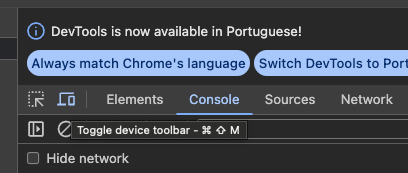
Toggle device toolbar: CMD/Ctrl + Shift + M
Why UnfollowUsers?
Smart Delays
Random 1-3 second delays between actions to mimic human behavior
Whitelist Support
Keep your favorite accounts safe from being unfollowed
Daily Limits
Built-in limits to prevent account restrictions
Easy to Use
One-click operation directly in your browser
How It Works
Install Extension
Add UnfollowUsers to Chrome from the Web Store
Go to Following
Navigate to your Instagram following page
Click Start
Open the extension and click Start to begin
Simple Pricing
Choose the plan that works for you
Free
- ✓ 10 unfollows per day
- ✓ 10 per session
- ✓ 100 whitelist entries
- ✓ Manual operation
Basic
- ✓ 50 unfollows per day
- ✓ 25 per session
- ✓ 1,000 whitelist entries
- ✓ Priority support
Pro
- ✓ Unlimited unfollows
- ✓ 100+ per session
- ✓ Unlimited whitelist
- ✓ Auto-cooldown
- ✓ Priority support
Frequently Asked Questions
Is it safe to use?
Yes! We use smart delays and daily limits to mimic human behavior and prevent account restrictions.
Will I lose my followers?
No. UnfollowUsers only removes people you follow who don't follow you back.
How do I add a whitelist?
Paste usernames (one per line) in the whitelist field. These accounts will never be unfollowed.